A Solar inverter is one of the most important components of a rooftop Solar system.
It converts the electricity generated by Solar panels into usable AC electricity for your home or business and, in grid-connected systems, manages the interaction between the Solar system and the electricity grid.
Like any electronic device, a Solar inverter can sometimes display warnings or error messages.
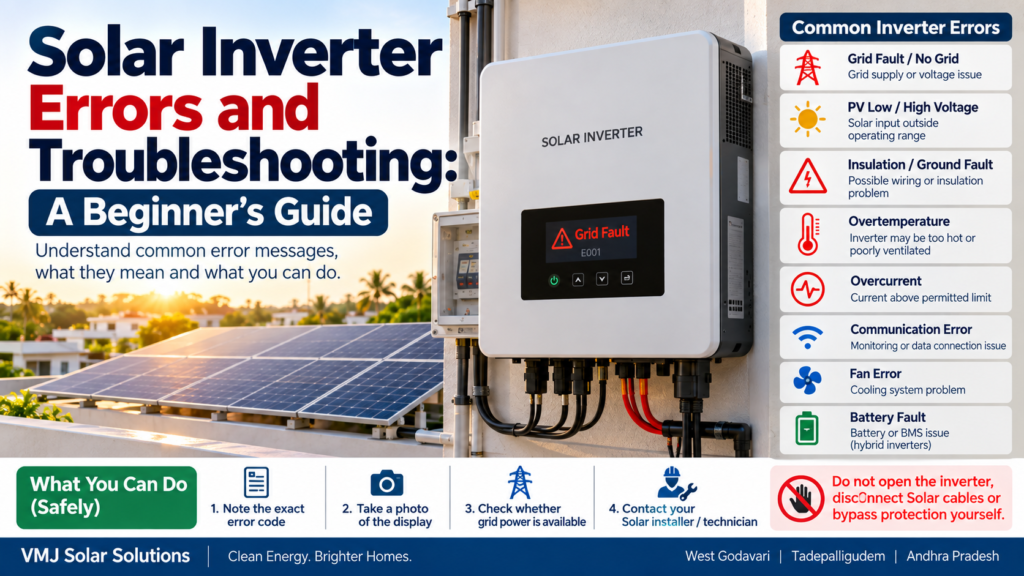
You may see messages such as:
- Grid Fault
- No Grid
- PV Overvoltage
- Low PV Voltage
- Insulation Fault
- Ground Fault
- Overtemperature
- Overcurrent
- Isolation Fault
- Communication Error
- Arc Fault
- Fan Error
- Battery Fault
Seeing an error does not automatically mean that the inverter has failed.
Some warnings can be caused by temporary grid conditions, insufficient sunlight, high temperatures, communication problems or protection devices operating as designed.
However, Solar systems contain potentially hazardous DC and AC voltages. Homeowners should therefore avoid opening the inverter or disconnecting Solar wiring themselves.
This guide explains what common inverter errors can mean, what you can safely check, and when professional service is required.
What Should You Do When a Solar Inverter Shows an Error?
When your Solar inverter displays an error:
- Read and record the exact error code.
- Check whether the electricity grid is available.
- Check whether the error disappears after normal conditions return.
- Check the inverter display or monitoring app.
- Look for obvious external issues such as an inverter shutdown or tripped AC protection.
- Follow the manufacturer’s user manual.
- Contact your Solar installer if the error continues.
- Do not open the inverter or touch DC cables yourself.
The exact troubleshooting procedure varies by inverter manufacturer and model.
Why Does a Solar Inverter Show an Error?
An inverter continuously monitors different parts of the Solar system.
It can monitor:
- Solar panel voltage
- Solar panel current
- Grid voltage
- Grid frequency
- Internal temperature
- Insulation resistance
- Ground-fault conditions
- AC output
- DC input
- Battery condition
- Communication
- Internal electronics
- Surge protection
- Arc-fault detection, where equipped
If a measured value moves outside the inverter’s programmed operating limits, it may stop Solar generation and display a warning or error.
This is often a protection function, not necessarily an inverter failure.
1. No Grid or Grid Fault
This is one of the common warnings on grid-connected Solar systems.
It generally means the inverter is not detecting acceptable grid conditions.
Possible causes include:
- Power outage
- Low grid voltage
- High grid voltage
- Grid frequency outside the permitted range
- Tripped AC breaker
- Loose electrical connection
- Utility-side issue
- Temporary voltage fluctuation
What can a homeowner check?
You can safely check whether:
- Other appliances in the house have electricity
- The utility supply is available
- The inverter display shows a grid-related message
- The monitoring application reports a grid outage
Do not open electrical panels or touch internal wiring.
If grid power is available but the inverter continues to show a grid fault, contact your installer or electrician.
2. PV Low Voltage or Low DC Voltage
This warning can occur when the inverter is receiving insufficient DC voltage from the Solar array.
Possible reasons include:
- Very low sunlight
- Early morning
- Late evening
- Heavy shading
- Snow or severe environmental conditions in applicable regions
- String configuration issue
- Loose connection
- Module/string fault
- DC isolator issue
In India, low PV voltage can sometimes simply occur around sunrise or sunset when Solar irradiance is insufficient.
If the message disappears once sunlight becomes stronger, it may not indicate a serious fault.
If it continues during strong daylight conditions, professional inspection may be necessary.
3. PV Overvoltage
This warning means the DC voltage reaching the inverter is above its permitted operating or maximum input range.
Possible causes can include:
- Incorrect Solar string design
- Too many modules connected in series
- Cold-weather voltage increase
- Wiring/configuration error
- Incorrect inverter selection
- Installation error
This is a condition that should not be ignored.
Do not disconnect Solar cables yourself.
The maximum Solar string voltage should be checked against the inverter’s specifications by a qualified technician.
4. Insulation Fault or Isolation Fault
An insulation fault can indicate an electrical insulation problem somewhere in the Solar PV system.
Potential causes include:
- Damaged DC cable
- Water/moisture ingress
- Damaged connector
- Damaged junction box
- Cable insulation deterioration
- Module insulation problem
- Incorrect installation
Rain and moisture can sometimes make an existing insulation problem more noticeable.
Important safety warning
Do not touch Solar cables or metal parts of the PV system when an insulation or ground-fault warning is present.
Solar panels can continue generating DC electricity whenever sufficient light is available.
This type of fault should generally be investigated by a qualified Solar technician.
5. Ground Fault
A ground fault can indicate unintended electrical contact between an energized conductor and ground.
Possible causes include:
- Damaged cable insulation
- Water entering a connector
- Faulty module
- Damaged junction box
- Wiring problem
- Installation defect
Ground-fault conditions can present an electric-shock hazard.
Do not attempt to locate or repair a ground fault yourself.
The technician may need specialised electrical testing equipment to identify the affected Solar string or component.
6. Overtemperature or High Temperature
Solar inverters operate within specified temperature ranges.
If internal temperature becomes too high, the inverter may reduce output or temporarily stop operation to protect itself.
Possible causes include:
- High ambient temperature
- Direct sunlight on the inverter
- Poor ventilation
- Dust accumulation around ventilation openings
- Blocked airflow
- Inadequate installation clearance
- Internal fan problem
What can you safely check?
Look around the inverter.
Make sure:
- Ventilation openings are not blocked
- No objects are covering the inverter
- The area around the inverter is reasonably ventilated
- The inverter is not enclosed in a poorly ventilated cabinet
Do not dismantle the inverter to clean its internal components.
7. Overcurrent Error
An overcurrent warning indicates that current has exceeded the inverter’s permitted operating range or a protection threshold.
Possible causes include:
- Electrical fault
- Incorrect Solar string configuration
- Short circuit
- Wiring issue
- Component failure
- Grid-side abnormality
Repeated overcurrent errors should be investigated rather than repeatedly resetting the inverter.
8. Arc Fault Warning
Some modern Solar inverters include arc-fault detection.
An electrical arc can occur when an electrical connection becomes damaged or compromised.
Possible causes include:
- Loose connection
- Damaged cable
- Faulty connector
- Poor crimping
- Cable damage
- Connector mismatch
An arc fault can present a fire risk.
If your inverter reports an arc fault, follow the manufacturer’s instructions and contact a qualified technician.
Do not attempt to repair DC connectors yourself.
9. Communication Error
Not every inverter problem is an electrical problem.
A communication error may involve:
- Wi-Fi
- Ethernet
- RS485
- Data logger
- Smart meter
- Monitoring gateway
- Internet connection
- Inverter-to-device communication
The Solar panels may still be generating electricity even when the monitoring application is offline.
What can you check?
You can check:
- Whether your home internet is working
- Whether the inverter’s monitoring device has power
- Whether the monitoring app is showing an offline status
Avoid assuming that:
“No data in the app = Solar system not generating.”
The inverter display or generation meter can provide additional information.
10. Fan Error
Some inverters use cooling fans.
A fan-related error can occur because of:
- Dust
- Fan obstruction
- Fan failure
- Excessive temperature
- Internal component problem
Do not insert objects into the inverter ventilation openings.
If the warning persists, arrange professional inspection.
11. Battery Fault on a Hybrid Inverter
Hybrid Solar systems may display battery-related errors.
Possible causes include:
- Low battery voltage
- Battery communication failure
- Battery temperature issue
- Battery protection state
- Incorrect battery configuration
- Battery management system warning
- Loose connection
- Battery ageing
Battery systems can involve significant electrical energy even when the grid and Solar panels are unavailable.
Do not open a lithium battery enclosure or attempt internal battery repairs.
Solar Inverter Error vs Warning: What’s the Difference?
The terminology varies between manufacturers.
Generally:
Warning
A warning indicates that the system has detected an unusual condition but may still be operating.
Error/Fault
A fault generally means the inverter has detected a condition that requires intervention or has stopped a particular function.
Information/Status
A status message may simply describe normal operation.
For example:
“Waiting for Solar”
is very different from:
“Insulation Fault.”
Always check the manufacturer’s manual for the exact meaning of the message.
Can I Restart My Solar Inverter?
Sometimes a controlled restart can clear a temporary error.
However, the restart procedure is manufacturer-specific.
Some manufacturers provide a defined AC/DC shutdown and restart sequence. Others may require an installer or service technician.
Therefore:
Do not randomly switch AC and DC isolators on and off.
If the user manual provides a homeowner-safe restart procedure, follow it exactly.
If you’re unsure, contact your installer.
What Can a Homeowner Safely Check?
A beginner can usually perform a few non-invasive checks.
Check 1: Look at the display
Record:
- Error code
- Warning message
- Time
- Inverter status
- Any unusual LED pattern
Check 2: Check the monitoring app
Look for:
- Current Solar generation
- Historical generation
- Grid status
- Error history
Check 3: Check whether the grid is available
If your home has no electricity, the inverter may simply be responding to a grid outage.
Check 4: Look for obvious external conditions
Check whether:
- The inverter appears powered
- Ventilation is blocked
- There is visible external damage
- There is water around the equipment
Do not touch electrical components.
Check 5: Contact the installer
Provide:
- Inverter make
- Model
- Error code
- Photograph of the display
- Time the error occurred
- Weather conditions
- Whether the grid was available
This can make troubleshooting faster.
What Should You NOT Do?
This is one of the most important sections for beginners.
Don’t open the inverter
Even after shutdown, electrical energy may remain present.
Don’t disconnect MC4/DC connectors
PV strings can remain energised in daylight.
Don’t touch exposed cables
A Solar array can produce DC voltage whenever it receives light.
Don’t bypass a protection device
Never bypass:
- DC isolators
- AC breakers
- Surge protection
- Fuses
- Ground-fault protection
- Inverter safety functions
Don’t repeatedly reset a serious fault
If the same error returns repeatedly, the underlying cause should be identified.
Don’t spray water on the inverter
Cleaning should follow the manufacturer’s instructions.
Why Solar Inverter Errors Should Not Be Ignored
An inverter fault may be relatively simple, but it can also indicate a deeper electrical issue.
For example:
Error → Temporary grid fluctuation
may resolve when grid conditions return to normal.
But:
Error → Damaged DC cable → Insulation problem
requires professional attention.
Similarly:
High temperature → Poor ventilation
may be manageable after correcting the installation environment.
But:
High temperature → Internal component failure
may require service.
The error code is therefore a starting point for diagnosis, not the final diagnosis.
Common Solar Inverter Error Troubleshooting Table
| Error/Warning | Possible Cause | What You Can Do |
|---|---|---|
| No Grid | Power outage/grid issue | Check household grid supply |
| Grid Fault | Voltage/frequency issue | Record code and contact installer if persistent |
| PV Low Voltage | Low sunlight/string issue | Check again during strong daylight |
| PV Overvoltage | String voltage too high | Stop DIY work; call technician |
| Insulation Fault | Cable/moisture/insulation issue | Do not touch PV wiring |
| Ground Fault | Electrical leakage/fault | Professional inspection required |
| Overtemperature | Heat/ventilation issue | Check external ventilation |
| Overcurrent | Electrical/system issue | Contact installer |
| Arc Fault | Possible damaged connection/cable | Professional inspection |
| Communication Error | Wi-Fi/data connection | Check monitoring connection |
| Fan Error | Cooling problem | Keep ventilation clear; call service |
| Battery Fault | Battery/BMS/configuration issue | Contact battery/inverter technician |
Important: Error names and meanings vary between manufacturers and models. Always use the exact inverter manual for diagnosis.
Why Weather Can Trigger Inverter Warnings
Solar inverter performance can be affected by environmental conditions.
During very hot weather
High temperatures can cause:
- Reduced Solar module output
- Higher inverter operating temperature
- Thermal derating
- Overtemperature warnings in extreme conditions
During heavy rain
Moisture can expose existing:
- Cable insulation problems
- Connector issues
- Junction-box problems
During thunderstorms
Lightning and electrical surges can affect Solar and electrical equipment.
Proper earthing, surge protection and lightning-protection design are therefore important parts of a rooftop Solar installation.
What About Dust and Bird Droppings?
Dust and bird droppings generally affect Solar generation, rather than directly causing a specific inverter fault.
However, severe soiling can reduce PV voltage/current enough to affect inverter operation under certain conditions.
Bird activity can also contribute to:
- Cable damage
- Connector contamination
- Localised heating
- Nesting near equipment
Regular inspection and appropriate maintenance can help identify these problems before they become larger issues.
When Should You Call a Solar Technician?
Contact your installer or a qualified technician when:
- The same error repeatedly returns
- An insulation/ground fault appears
- PV overvoltage is displayed
- An arc-fault warning appears
- There is visible cable damage
- The inverter smells burnt
- There are scorch marks
- The inverter makes unusual sounds
- The inverter repeatedly shuts down
- Generation suddenly drops without an obvious reason
- The inverter shows a hardware fault
- Battery faults appear on a hybrid system
Emergency situation
If you notice:
- Smoke
- Fire
- Burning smell
- Sparking
- Damaged electrical equipment
- Exposed conductors
Stay away from the equipment and contact the appropriate emergency/electrical service.
Do not attempt to repair the system yourself.
How to Prevent Solar Inverter Problems
Prevention is generally better than troubleshooting.
1. Keep the inverter properly ventilated
Do not cover or obstruct ventilation openings.
2. Inspect cables periodically
Look for visible damage, especially where cables may be exposed to weather, animals or mechanical stress.
3. Monitor Solar generation
Sudden changes can sometimes reveal problems before an obvious failure occurs.
4. Keep the installation clean
Follow manufacturer instructions for cleaning around the inverter and electrical equipment.
5. Maintain proper earthing and surge protection
These are important parts of electrical safety.
6. Use compatible equipment
Panels, inverter, battery and protection devices should be correctly matched.
7. Keep documentation
Store:
- Inverter manual
- Warranty
- Installation report
- Electrical drawings
- Serial numbers
- Service records
This can make future troubleshooting easier.
Solar Inverter Maintenance Checklist
For homeowners and businesses:
☐ Check inverter status regularly
☐ Monitor Solar generation
☐ Record recurring error codes
☐ Keep inverter ventilation clear
☐ Inspect accessible areas for visible damage
☐ Check monitoring connectivity
☐ Schedule professional electrical inspection when appropriate
☐ Check earthing and protection as part of qualified maintenance
☐ Review inverter firmware/software where manufacturer support recommends it
☐ Keep warranty and installation documents
☐ Never bypass protection devices
Solar Inverter Troubleshooting for Homes in Andhra Pradesh
Homes in West Godavari, Tadepalligudem and across Andhra Pradesh can experience a combination of:
- High summer temperatures
- Monsoon rain
- Dust
- Humidity
- Thunderstorms
- Grid-voltage fluctuations
- Bird activity
These conditions make correct Solar installation and periodic maintenance important.
An inverter error should therefore be evaluated in the context of the entire system.
For example, a recurring grid-voltage warning may require checking the utility supply and the home’s electrical connection—not automatically replacing the inverter.
Similarly, an insulation fault after heavy rain may require inspection of PV cables, connectors and junction boxes.
What Information Should You Give Your Solar Installer?
When reporting an inverter error, send:
1. Inverter brand and model
2. Exact error code
3. Photograph of the display
4. Date and time of the error
5. Whether the grid was available
6. Weather conditions
7. Whether Solar generation stopped
8. Whether the error is recurring
9. Any unusual sound, smell or visible damage
10. Monitoring-app screenshot, if available
This information can help the technician identify the likely area of the problem before visiting the site.
Final Beginner’s Rule
When your Solar inverter shows an error, remember:
Read → Record → Check → Report
Read
Understand the exact error message.
Record
Take a photograph and note the time.
Check
Safely check grid availability and the monitoring app.
Report
Contact your Solar installer if the problem persists or involves an electrical fault.
The most important rule is:
Don’t troubleshoot live Solar wiring yourself.
Solar panels can generate DC electricity whenever light reaches them, and inverter systems can contain hazardous electrical voltages.
FAQs: Solar Inverter Errors
1. Why is my Solar inverter showing an error?
It may be responding to a grid problem, low Solar input, high temperature, insulation issue, communication problem, battery fault or another abnormal operating condition.
2. Is a Solar inverter error always serious?
No. Some warnings can be temporary, such as a grid interruption or insufficient Solar input. Repeated or electrical-safety-related faults should be investigated.
3. Why does my inverter show “No Grid”?
The inverter may not be detecting acceptable grid voltage or frequency. Check whether your home has electricity and contact your installer if the message persists.
4. Why does my Solar inverter show an insulation fault?
It can indicate an insulation problem involving a cable, connector, module or other PV component. Professional testing is normally required.
5. Can I reset my Solar inverter myself?
Only if the manufacturer provides a homeowner-safe reset procedure. Do not randomly operate AC/DC isolators or open the inverter.
6. Why does my inverter stop during very hot weather?
The inverter may reduce output or shut down temporarily if its internal temperature reaches a protection threshold. Ventilation and installation conditions should be checked.
7. Can rain cause Solar inverter errors?
Rain itself does not necessarily indicate a problem, but moisture can reveal existing insulation, connector or cable issues.
8. Why is my Solar app showing an error?
The app may be reporting an inverter fault or simply a communication/internet problem. Check the inverter display as well as the monitoring application.
9. Should I switch off my Solar system if there is an error?
Follow the manufacturer’s instructions. For serious electrical warnings, smoke, burning smell or visible damage, stay away from the equipment and contact a qualified professional.
10. How often should a Solar inverter be serviced?
The appropriate maintenance frequency depends on the inverter manufacturer, installation environment and system type. Monitoring performance regularly and arranging professional inspection when warnings or abnormal behaviour occur is important.
Conclusion
Solar inverter errors can look complicated, but many messages fall into a few broad categories:
Grid → PV input → Temperature → Electrical protection → Communication → Battery → Hardware
The important thing is not to guess what an error means or repeatedly reset the system.
Start by recording the exact error code, checking basic external conditions and consulting the manufacturer’s documentation.
For electrical faults such as insulation faults, ground faults, PV overvoltage, arc faults or damaged cables, professional inspection is the safer approach.
For Solar owners in West Godavari, Tadepalligudem and Andhra Pradesh, regular monitoring and professional maintenance can help identify issues early and keep a rooftop Solar system operating safely.
A good Solar system is not just about installing panels—it also requires correct inverter selection, electrical protection, safe installation, monitoring and ongoing maintenance.