
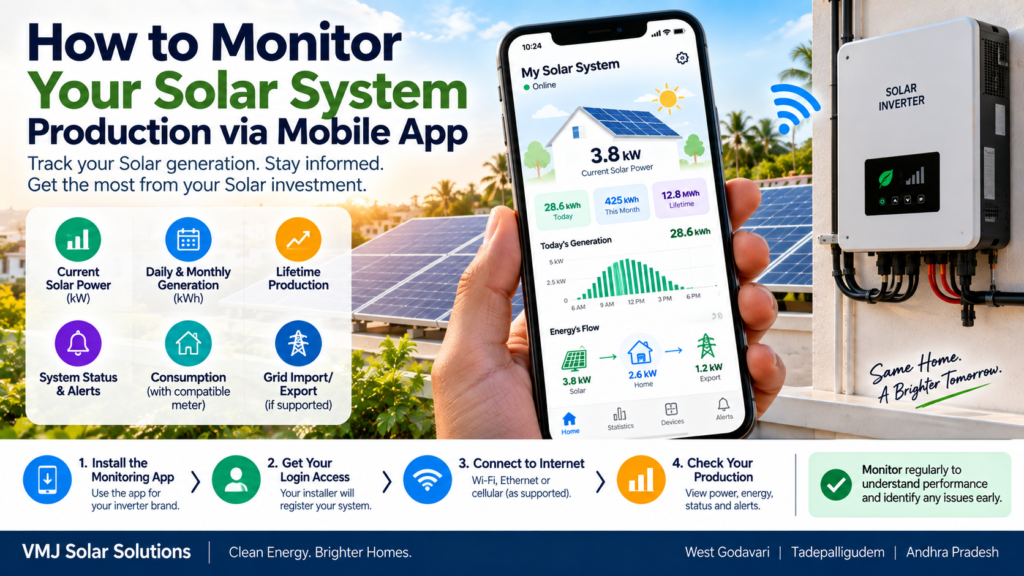
Installing a rooftop Solar system is only the beginning. Once your Solar panels and inverter are operating, monitoring your system through a mobile app can help you understand how much electricity your system is producing, identify unusual changes, check system status and track performance over time.
Modern Solar monitoring platforms can display information such as current Solar power, daily generation, monthly generation, lifetime production, system status, grid import/export, consumption and alerts. The exact information available depends on your inverter, communication device, energy meter and monitoring platform.
For homeowners, farmers and commercial Solar users in West Godavari, Tadepalligudem and across Andhra Pradesh, mobile monitoring can be particularly useful because it allows you to check your system without visiting the inverter every day.
Quick Answer: How Can I Monitor Solar Production on My Phone?
To monitor your Solar system from a mobile phone:
- Install the monitoring app provided or supported by your inverter manufacturer.
- Ask your Solar installer to register your system and provide monitoring access.
- Connect the inverter’s communication device to Wi-Fi, Ethernet, cellular or another supported connection.
- Log in to the app using your registered account.
- Check current power, daily energy, monthly energy and lifetime generation.
- Review alerts and system status regularly.
- Compare production across similar days or periods instead of judging performance from one day alone.
The app is mainly a monitoring and information tool. It does not automatically mean that every Solar system can be remotely controlled or repaired through the phone.
What Does a Solar Monitoring App Show?
The exact dashboard differs by manufacturer, but most modern monitoring platforms can provide several useful measurements.
1. Current Solar Power – kW
This shows approximately how much power the Solar system is producing at that moment.
For example, your app may show:
Solar Power: 3.2 kW
This means the system is producing around 3.2 kW at that particular time.
Current power changes continuously depending on:
- Sunlight intensity
- Time of day
- Clouds
- Temperature
- Panel orientation
- Shading
- System load
- Inverter operating conditions
Therefore, the current kW number should not be treated as the total electricity generated during the day.
2. Daily Energy Generation – kWh
This is one of the most useful numbers for a Solar owner.
For example:
Today’s Generation: 18.6 kWh
This means the Solar system generated approximately 18.6 units of electrical energy during the measured period.
In everyday electricity billing, 1 kWh is commonly referred to as 1 unit.
Daily production can vary considerably. A sunny day may produce more than a cloudy or rainy day, even when the Solar system itself is operating normally.
3. Monthly Generation
The app may also show total Solar generation for the current month.
For example:
September Generation: 425 kWh
Monthly data is often more useful than looking at one individual day because weather conditions can change significantly from day to day.
You can compare:
- This month vs previous month
- This year vs previous year
- Similar months
- Seasonal production patterns
However, comparisons should account for weather, shading and system changes.
4. Lifetime Solar Generation
Many monitoring platforms also display cumulative generation.
For example:
Lifetime Generation: 28.5 MWh
This gives you an overview of the total energy produced by the system since monitoring began or since the system was commissioned, depending on the platform.
Remember that the displayed lifetime figure can depend on how the monitoring system was configured and when data recording started.
How to Set Up Solar Monitoring on Your Mobile
The exact setup depends on the inverter brand and communication hardware, but the general process is similar.
Step 1: Identify Your Inverter Brand
First, check the name and model of your Solar inverter.
The monitoring application may be provided by:
- The inverter manufacturer
- The Solar installation company
- A third-party monitoring platform
Do not download an app simply because its name looks similar to your inverter brand.
Use the app recommended for your specific inverter model.
Step 2: Ask Your Installer for Monitoring Access
During commissioning, ask your installer:
“Is mobile monitoring enabled for my Solar system?”
You should ideally receive:
- App name
- Login or invitation details
- Site name
- Inverter information
- Communication setup details
- Basic instructions for viewing production
Some manufacturers require the installer to create the Solar site and invite the system owner before the owner can access the monitoring dashboard.
Step 3: Connect the Inverter to the Internet
Depending on the inverter and installation, communication may use:
- Wi-Fi
- Ethernet
- Cellular connectivity
- Manufacturer-specific communication equipment
The inverter does not necessarily need the same connection method across all brands.
Some systems can also use cellular communication, which can be useful where reliable local internet connectivity is difficult.
Step 4: Log in to the Mobile App
After the installer activates your account, download the appropriate official application and log in.
Once connected, you may see information such as:
System Status → Current Power → Today’s Energy → Monthly Energy → Lifetime Energy → Alerts
Some advanced systems may also provide consumption, battery, grid import/export and equipment-level information.
How to Read Your Solar Monitoring Dashboard
Understanding the numbers is more important than simply checking the app.
Solar Production vs Solar Power
These two terms are often confused.
Power = kW
It represents the rate at which electricity is being produced at a particular moment.
Energy = kWh
It represents the amount of electricity generated over a period of time.
For example:
Your inverter may currently be producing 4 kW, while your total production for the day may be 22 kWh.
Both measurements are useful, but they tell you different things.
What Is a Normal Solar Production Pattern?
A typical rooftop Solar system often follows a pattern similar to this:
Morning: Production starts increasing after sunrise.
Late morning: Production generally increases as Solar irradiance rises.
Around midday: Production may reach a higher level, depending on system orientation, weather, temperature and design.
Afternoon: Production gradually decreases.
Evening: Production approaches zero as sunlight disappears.
This creates a broad bell-shaped or curved production pattern on many monitoring dashboards.
It will not look exactly the same every day.
Clouds, rain, haze, shading and seasonal changes can significantly affect the curve.
How to Know If Your Solar System Is Performing Normally
Don’t immediately assume there is a problem because today’s production is lower than yesterday.
Instead, check several indicators.
Compare Similar Days
Compare:
- Sunny day with sunny day
- Cloudy day with cloudy day
- Similar months
- Similar seasons
A rainy day should not normally be compared directly with a clear-sky day.
Check the System Status
Look for indicators such as:
- Online
- Running
- Grid connected
- Normal
- Warning
- Fault
- Offline
The exact terminology depends on the manufacturer.
Look for Sudden Changes
A sudden and persistent drop in production can be more useful as a warning sign than a small day-to-day variation.
For example, if your system usually produces normally but suddenly shows very low generation on several clear days, the installer may need to investigate.
Can a Mobile App Show Solar Consumption?
Sometimes—but not automatically on every Solar installation.
There is an important difference between Solar production monitoring and home/business energy consumption monitoring.
Your inverter may know how much Solar electricity it is producing, but that does not necessarily mean it knows how much electricity the building is consuming.
A compatible energy meter or monitoring device may be required to measure consumption and distinguish between:
- Solar production
- Self-consumption
- Grid import
- Grid export
For example, some monitoring platforms provide separate production and consumption information when the required energy meter is installed.
Can I See Grid Import and Solar Export on the App?
Depending on your system design and metering equipment, you may be able to see:
Solar Generation → Home/Business Consumption → Grid Export
and, when Solar generation is insufficient:
Grid Import → Building Consumption
This can be especially useful for users with larger Solar systems, batteries or energy-management equipment.
However, the app’s figures should not automatically be treated as the official electricity-bill settlement. Your utility meter and applicable regulatory arrangement determine billing and export/import accounting.
For Andhra Pradesh, rooftop Solar arrangements are governed by the applicable APERC framework and amendments, so consumers should verify the current rules applicable to their connection.
How Often Does the App Update Solar Data?
The update frequency depends on:
- Inverter manufacturer
- Monitoring platform
- Communication method
- Internet connectivity
- Server communication
- System configuration
Some platforms update data frequently, while others may show periodic updates.
For example, SolarEdge states that its monitoring data is usually updated every 15 minutes, while Huawei’s monitoring documentation shows current power and energy-yield information along with alarm and device-monitoring functions.
Therefore, don’t assume that a displayed number changes every second just because your inverter is producing electricity continuously.
What If the Solar App Shows “Offline”?
An offline monitoring message does not necessarily mean that the Solar panels have stopped producing electricity.
The Solar system and the communication system are related but not identical.
Possible causes include:
- Wi-Fi interruption
- Internet outage
- Router replacement
- Weak Wi-Fi signal
- Communication device issue
- Inverter communication problem
- Cellular connectivity problem
- Cloud/server communication issue
- Power interruption
- Inverter shutdown
First check whether the inverter itself shows a normal operating status.
If the inverter is operating but the app has stopped receiving data, the issue may be with communication rather than Solar generation itself.
What If Production Data Suddenly Disappears?
Try these safe checks:
1. Check the Last Updated Time
See when the app last received information.
2. Check Internet Connectivity
If your system uses Wi-Fi, verify whether the site’s internet connection is working.
3. Check the Inverter Display
If your inverter has a display, check whether it shows a warning or fault.
4. Check for a System Alert
Look for error codes or warning notifications in the monitoring application.
5. Contact Your Installer
If data remains unavailable or the inverter shows a fault, provide the installer with:
- Error code
- Screenshot
- Time of occurrence
- Last successful update
- Current inverter status
Some manufacturers specifically recommend checking the last-update information and inverter communication when production data is not being displayed.
Can the App Detect Solar Panel Problems?
Sometimes it can help identify unusual system behavior, but the app does not replace physical inspection.
Depending on the Solar system architecture, monitoring may identify:
- Low production
- Inverter faults
- Communication problems
- Abnormal equipment status
- Module-level performance differences
- Battery problems
- Grid-related issues
Advanced monitoring platforms can provide more detailed information than basic inverter apps. Some systems can even display module-level performance when the necessary hardware and configuration are available.
However, an app alert should be treated as an indication for investigation, not automatically as proof of a specific physical fault.
How Often Should You Check Your Solar App?
You don’t need to stare at the dashboard every day.
For a residential system, a practical approach may be:
Daily or Every Few Days
Check whether the system is online and producing normally.
Weekly
Look at the production trend and check for unusual alerts.
Monthly
Review total generation and compare it with previous periods.
During Unusual Events
Check the app after:
- Heavy rain
- Cyclones
- Extended power outages
- Major electrical work
- Internet/router changes
- Inverter warnings
For commercial systems, monitoring frequency may be higher because production and downtime can have a larger operational impact.
Use Solar Monitoring to Improve Energy Usage
Mobile monitoring is not only about finding faults.
It can also help you understand when your Solar system produces the most electricity.
For example, if your system consistently produces substantial energy during the late morning and afternoon, you may consider scheduling suitable electricity-consuming activities during those periods.
Examples can include:
- Water pumping
- Washing machines
- Water heating
- Agricultural equipment
- Cold-storage operations
- Commercial refrigeration
- EV charging
The suitability depends on the equipment, operating requirements, electricity tariff and Solar system design.
Some advanced monitoring systems allow users to compare Solar production with consumption and identify opportunities to shift electricity use toward Solar-generation periods.
Solar Monitoring for Farmers and Commercial Businesses
Mobile monitoring can be particularly useful beyond residential rooftops.
Farmers
Agricultural Solar users can monitor:
- Solar generation
- Pumping-related system performance
- Inverter status
- Daily production
- Communication status
Dairy Farms
Solar monitoring can help track production while the farm continues its regular operations.
Aqua Farms
For Solar-powered aerators and other equipment, monitoring can help identify unusual production or system interruptions.
Shops and Supermarkets
Businesses can compare Solar generation with daytime electricity usage and understand how much of their daytime demand may be supported by Solar.
Hotels, Schools and Hospitals
Monitoring can provide a centralized view of Solar production and help facility teams identify unusual system behavior.
Factories and Rice Mills
Larger commercial systems may benefit from more detailed monitoring, especially when energy meters, multiple inverters or advanced monitoring platforms are installed.
Does Solar Monitoring Reduce Your Electricity Bill?
The monitoring app itself does not reduce your electricity bill.
Instead, it provides information that may help you manage Solar energy more effectively.
For example, understanding when Solar production is highest can help you make better decisions about daytime electricity use.
Actual bill savings depend on factors such as:
- Solar system size
- Electricity consumption
- Tariff structure
- Self-consumption
- Export arrangements
- System performance
- Weather
- Applicable regulations
Important: Mobile Monitoring Is Not the Same as Remote Repair
One common misunderstanding is that if your installer can see the Solar system online, they can automatically fix every problem remotely.
That’s not always the case.
Remote monitoring can help a technician understand:
- System status
- Historical production
- Alerts
- Communication status
- Some equipment parameters
But certain problems require an on-site inspection by a qualified technician.
Never open the inverter or disconnect Solar cables simply because the app shows an error.
Solar DC circuits can remain electrically dangerous during daylight, and electrical protection should not be bypassed.
What Should You Ask Your Solar Installer About Mobile Monitoring?
Before completing your Solar installation, ask these questions:
- Which mobile app will monitor my Solar system?
- Will I receive my own login?
- Can I see daily, monthly and lifetime generation?
- Can I see system alerts?
- Does the system require Wi-Fi?
- What happens if my internet connection goes down?
- Can I monitor grid import and Solar export?
- Is an additional energy meter required for consumption monitoring?
- How long is monitoring data stored?
- Who should I contact if the system goes offline?
- Can the installer remotely diagnose certain inverter issues?
- Will monitoring remain available after the installation warranty period?
Getting clear answers before installation can prevent confusion later.
Mobile Solar Monitoring Checklist
Keep this simple checklist handy:
☑ Install the correct official monitoring app
☑ Create your own account
☑ Confirm the Solar site is correctly registered
☑ Check today’s generation
☑ Check monthly generation
☑ Check lifetime generation
☑ Review system status
☑ Check alerts periodically
☑ Know the last-update time
☑ Understand whether consumption monitoring is installed
☑ Save your installer’s contact details
☑ Don’t attempt electrical repairs yourself
Why Mobile Monitoring Is Becoming an Important Solar Feature
As rooftop Solar systems become more connected, monitoring is becoming an increasingly important part of system operation.
Modern monitoring platforms can provide more than a simple generation number. Depending on the system, they may combine:
Solar production + consumption + grid flow + battery + alerts + historical data
This gives homeowners and businesses a clearer picture of how their energy system is operating.
India’s Ministry of New and Renewable Energy has also issued 2026 guidance concerning inverter-level generation data and storage for rooftop Solar systems, showing the increasing importance of detailed Solar-generation data in the rooftop sector.
How VMJ Solar Solutions Can Help
For Solar installations in West Godavari, Tadepalligudem and nearby areas of Andhra Pradesh, VMJ Solar Solutions can help customers understand not only the Solar installation itself but also how to monitor system performance after commissioning.
A good Solar monitoring setup should make it easier for the system owner to understand:
- How much Solar energy is being generated
- Whether the inverter is operating normally
- Whether alerts are appearing
- How production changes with weather
- Whether additional technical inspection may be required
The goal is not to check the app constantly. It is to use the available data to identify trends, understand your system and respond to genuine issues when they occur.
FAQs: Solar Monitoring Mobile App
1. How can I check my Solar panel production on my phone?
Install the monitoring app supported by your inverter and log in using the account provided by your installer. The dashboard may show current power, daily generation, monthly generation and lifetime production.
2. Which app is used to monitor a Solar system?
The app depends on the inverter and monitoring platform installed at your property. Ask your Solar installer for the correct official application for your inverter model.
3. Can I monitor Solar production without Wi-Fi?
It depends on the system. Some installations use Wi-Fi, while others can use Ethernet or cellular communication. Your installer can confirm the communication method used by your system.
4. Can the Solar app show electricity consumption?
It may, but consumption monitoring may require a compatible energy meter or additional hardware. Production monitoring alone does not necessarily measure the building’s total electricity consumption.
5. Why does my Solar app show zero production?
If it is nighttime, zero production can be normal. During daylight, investigate the system status, last-update time, weather conditions and any displayed alerts. If the issue persists, contact your installer.
6. Why does my Solar app show “offline”?
The monitoring connection may have been interrupted because of an internet, Wi-Fi, communication or inverter issue. An offline monitoring connection does not automatically prove that the Solar panels have stopped generating electricity.
7. How often should I check my Solar monitoring app?
For a residential system, checking the system status regularly and reviewing production trends periodically is usually sufficient. Commercial systems may require more frequent monitoring depending on their operating requirements.
8. Can a Solar monitoring app detect a faulty panel?
Some advanced systems can identify unusual module-level performance, but not every Solar system has module-level monitoring. A technician may still need to inspect the system physically.
9. Can I check Solar generation from another city?
If your Solar system has internet or cellular communication and the monitoring service is active, remote access may be possible. The exact functionality depends on the manufacturer and monitoring platform.
10. Is Solar app data the same as my electricity meter reading?
No. Solar monitoring data and utility-meter readings can serve different purposes. For billing and official import/export settlement, refer to the applicable utility meter and regulatory arrangement.
Conclusion
A Solar monitoring app turns your smartphone into a convenient window into your rooftop Solar system.
By regularly checking current power, daily generation, monthly production, system status and alerts, you can better understand how your Solar installation behaves throughout the year.
The most important point is not to worry about every small change in daily generation. Solar output naturally changes with sunlight, clouds, rain, temperature, shading and seasonal conditions.
Instead, look for persistent or unusual changes, use the monitoring data to communicate clearly with your Solar installer, and leave electrical troubleshooting to qualified professionals.
For homeowners, farmers and businesses in West Godavari, Tadepalligudem and Andhra Pradesh, a well-configured monitoring system can make Solar ownership more transparent, easier to manage and more informative over the long term.