
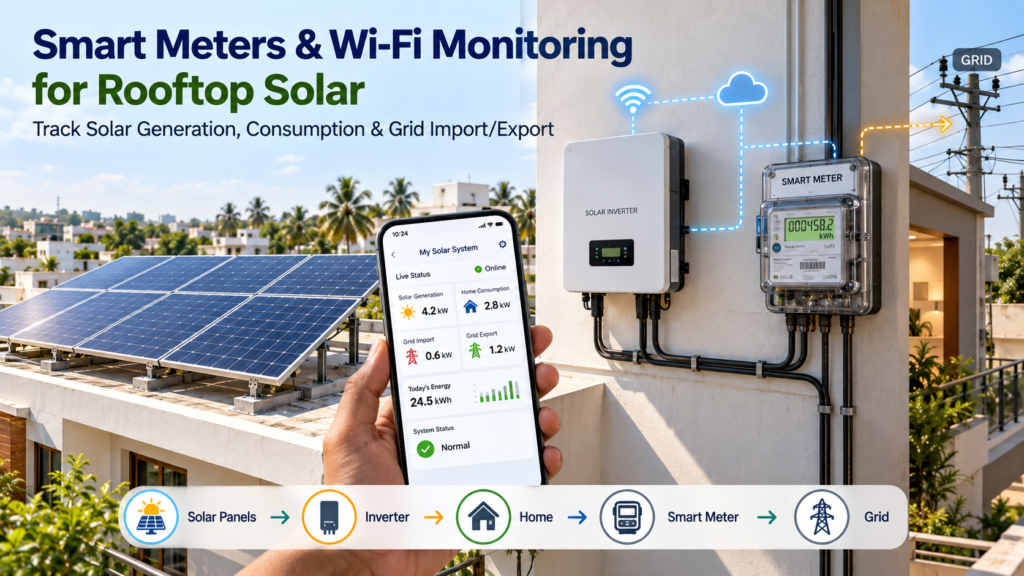
Installing Solar panels is only one part of managing a rooftop Solar system.
Once the system is operating, homeowners and businesses also need a practical way to understand how much Solar electricity is being generated, how much energy is being consumed, how much electricity is imported from the grid and how much surplus is exported.
This is where smart meters and Wi-Fi-enabled Solar monitoring can become useful.
However, these two technologies do different jobs.
A Solar inverter’s Wi-Fi monitoring system generally helps you understand Solar generation and inverter performance, while a smart or bidirectional electricity meter measures the electricity exchanged with the grid. APEPDCL’s own Solar explanation highlights this distinction: the inverter/vendor app can show total Solar generation, whereas the net meter records electricity exported to and imported from the grid.
Understanding the difference can help Solar owners interpret their apps, electricity bills and system performance more accurately.
Quick Answer: Why Are Smart Meters and Wi-Fi Monitoring Important for Solar?
Smart meters and Wi-Fi monitoring provide different but complementary information about a rooftop Solar system.
- Solar inverter monitoring can show Solar generation, inverter status, power output and historical performance.
- Wi-Fi monitoring can make this information accessible through a mobile app or web portal.
- Smart meters can provide detailed electricity-consumption information and communicate data to the electricity distribution utility.
- Bidirectional/net meters record electricity imported from and exported to the grid.
- Comparing these data sources can help identify unusual changes in Solar generation or electricity consumption.
In Andhra Pradesh, APEPDCL describes its smart-meter system as recording electricity usage at frequent intervals and transmitting the data automatically to its systems.
The key point is:
Your Solar monitoring app and your electricity meter may show different numbers because they are measuring different parts of the energy flow.
What Is a Smart Meter?
A smart meter is a digital electricity meter capable of recording electricity consumption and communicating information to the utility.
Unlike a traditional meter that may primarily provide cumulative readings, a smart-metering system can provide more detailed consumption information.
APEPDCL states that its smart meters can record electricity usage at frequent intervals and transmit data automatically. Its published information also says consumers can access usage history and bill-related information through digital platforms.
For a Solar consumer, this can provide useful information about the relationship between:
Solar generation → Home/business consumption → Grid import/export
However, a smart meter should not automatically be assumed to be the same thing as the Solar inverter monitoring system.
What Is Wi-Fi Monitoring in a Solar System?
Many modern Solar inverters can be connected to the internet through Wi-Fi or another communication method.
Once connected, the inverter can send operational data to a manufacturer’s monitoring platform or app.
Depending on the inverter and monitoring system, users may be able to see information such as:
- Current Solar power output
- Daily Solar generation
- Monthly generation
- Lifetime generation
- Inverter status
- Historical production
- System alerts
- Error messages
- Grid status
- Voltage and frequency information
- Individual MPPT or string information on supported systems
The exact features vary by inverter manufacturer and model.
Smart Meter vs Solar Monitoring App: What Is the Difference?
This is one of the most important concepts for Solar owners.
| Feature | Solar Inverter / Wi-Fi Monitoring | Smart / Net Meter |
|---|---|---|
| Solar generation | Usually available | Not necessarily the primary measurement |
| Home electricity consumption | May require additional energy meter/CT | Can provide consumption data depending on meter/system |
| Grid import | Not necessarily | Yes, for bidirectional/net metering |
| Grid export | Not necessarily | Yes, for bidirectional/net metering |
| Inverter performance | Yes | No |
| Inverter faults | Yes | No |
| Solar production history | Usually available | Not normally the primary purpose |
| Utility billing | No | Yes, where applicable |
| Remote utility data communication | Depends on system | Smart meters can communicate with utility systems |
This is why two screens can show different energy numbers without either one being wrong.
Why Does My Solar App Show More Units Than My Net Meter?
Suppose your Solar system generates:
20 kWh
Your home directly consumes:
8 kWh
The remaining:
12 kWh
may flow to the grid.
Your Solar inverter monitoring system may show:
Solar generation = 20 kWh
The net meter may show:
Export = 12 kWh
Why?
Because the 8 kWh consumed directly by your home did not pass through the grid meter.
The energy flow is:
Solar generation: 20 kWh
↓
Home consumption: 8 kWh
Grid export: 12 kWh
So:
20 − 8 = 12 kWh exported
APEPDCL illustrates this same principle in its consumer-facing Solar net-meter explanation.
What Does the Net Meter Measure?
A bidirectional net meter generally measures electricity flowing between the consumer installation and the electricity grid.
It can record:
Import
Electricity drawn from the grid when Solar generation is insufficient.
Export
Surplus electricity sent from the Solar system/site to the grid.
This is different from measuring every unit generated by the Solar panels.
For example:
Solar generation = 25 kWh
Direct consumption = 10 kWh
Export = 15 kWh
The meter sees the energy crossing the grid connection point—not necessarily all 25 kWh generated by the Solar panels.
What Does the Solar Inverter Monitor?
The inverter sits between the Solar panels and the AC electrical system.
Its monitoring platform may provide information about:
Current Generation
How much power the Solar system is producing at a particular moment.
Daily Generation
How many kWh have been generated during the day.
Monthly Generation
Useful for identifying seasonal production patterns.
Lifetime Generation
A long-term view of Solar production.
Inverter Status
Whether the inverter is operating normally.
Fault Alerts
Depending on the manufacturer, the system may notify the user about errors or abnormal conditions.
Grid Information
Some systems can display AC voltage, frequency and other electrical parameters.
How Does Wi-Fi Monitoring Help Detect Solar Problems?
One of the biggest advantages of remote monitoring is that it can make unusual changes easier to notice.
For example, imagine that a Solar system normally produces a certain amount of energy under similar weather conditions.
If generation suddenly drops significantly, possible causes could include:
- Heavy dust
- Bird droppings
- New shading
- Inverter fault
- Communication issue
- String fault
- Module-level problem
- DC connection issue
- AC-side issue
- Grid-related shutdown
- Severe weather
- Maintenance activity
A monitoring platform does not automatically identify the exact physical cause in every situation.
But it can provide an early indication that something deserves inspection.
Can Wi-Fi Monitoring Detect Every Solar Fault?
No.
Monitoring is a diagnostic aid, not a substitute for physical inspection.
For example, an inverter may report that its output has decreased, but the reason could require on-site investigation.
A technician may need to inspect:
- Solar modules
- DC cables
- Connectors
- Mounting structures
- Inverter
- AC protection
- Earthing
- Surge protection
- Shading
- Junction boxes
- Communication equipment
Therefore:
Monitoring → identifies unusual behaviour
Inspection → helps determine the physical cause
What Happens If Wi-Fi Internet Stops Working?
A common concern is:
“If my home Wi-Fi goes down, will my Solar system stop working?”
Not necessarily.
In many systems, the communication connection and the actual Solar power conversion are separate functions.
If the inverter loses internet connectivity, the inverter may continue operating normally if all electrical and grid conditions are satisfactory.
However, remote monitoring may temporarily stop updating.
The exact behaviour depends on the inverter and communication architecture.
Some systems can also store operational data locally and upload it after communication is restored.
Therefore, always check the monitoring specifications of the specific inverter installed at your property.
Does Solar Need Internet to Generate Electricity?
Not necessarily.
Internet connectivity is generally used for monitoring and communication, not for sunlight-to-electricity conversion itself.
A grid-connected inverter can operate according to its electrical control systems without needing your home Wi-Fi for every moment of Solar generation.
However, the inverter still has to satisfy grid requirements and protection conditions.
If the grid goes down, a standard grid-connected inverter normally shuts down for safety reasons.
That is different from an internet outage.
Internet outage
May affect monitoring and remote communication.
Grid outage
Can cause a standard grid-tied inverter to stop supplying Solar electricity.
A battery/hybrid system with appropriate backup functionality can behave differently.
Why Is Remote Solar Monitoring Useful for Homeowners?
Without monitoring, many Solar owners mainly look at their electricity bill.
But the bill may not tell you everything about the Solar system’s daily performance.
With monitoring, homeowners can observe:
- Today’s Solar generation
- Weekly generation
- Monthly generation
- Seasonal trends
- Inverter status
- Alerts
- Production patterns
This can make it easier to notice unusual changes.
For example, if the system suddenly produces substantially less energy than expected on a clear day, the owner can investigate instead of discovering the issue much later.
Why Is Monitoring Even More Useful for Commercial Solar?
Monitoring becomes particularly valuable when Solar systems are larger.
Commercial installations may have:
- Multiple inverters
- Larger roof areas
- Multiple Solar arrays
- Different orientations
- Multiple MPPTs
- Higher electricity consumption
- More complex electrical systems
A commercial monitoring platform can help operators track production without physically visiting the inverter every day.
This can be useful for:
- Factories
- Rice mills
- Cold storages
- Hotels
- Supermarkets
- Hospitals
- Warehouses
- Poultry farms
- Schools
- Commercial buildings
How Smart Meter Data Can Help Understand Electricity Consumption
Solar monitoring tells you what the Solar system is producing.
Smart-meter data can provide more information about how electricity is being consumed.
This can help answer questions such as:
- What time is electricity consumption highest?
- How much electricity is being used during the day?
- Are heavy loads running when Solar production is high?
- How much electricity is being imported?
- Is consumption increasing over time?
- Are there unusual consumption spikes?
APEPDCL describes smart meters as providing usage data and supporting consumption analysis through its digital platforms.
Solar Monitoring Can Help Increase Self-Consumption Awareness
For an on-grid Solar system, using Solar electricity directly at the property can be an important part of the energy equation.
For example, a business could schedule some flexible daytime loads when Solar production is available.
Possible loads include:
- Water pumping
- HVAC where operationally appropriate
- Refrigeration
- Industrial processing
- Battery charging
- Water heating
- Certain machinery
This does not mean every load should be shifted simply because Solar is available.
Operational requirements, equipment specifications and electricity tariffs should also be considered.
But monitoring can show when Solar production and electricity demand overlap.
Can Monitoring Help Reduce Electricity Bills?
It can help users make better energy-management decisions, but monitoring itself does not automatically reduce the bill.
The benefit comes from using the information.
For example, monitoring may reveal that:
- A large load operates during low-Solar hours.
- Solar generation is being curtailed or limited.
- A system is producing less than expected.
- Electricity consumption has increased.
- An appliance is running unusually long.
- A commercial facility has a significant daytime load that could be aligned with Solar generation.
The data can then support better operational decisions.
What Is an Energy Management System?
An energy management system goes beyond simply displaying Solar generation.
Depending on the equipment, it may combine:
- Solar generation data
- Grid import/export
- Building consumption
- Battery state of charge
- EV charging
- Load controls
- Time-of-use information
- Energy alerts
This can provide a more complete picture of how energy is moving through a property.
For larger commercial Solar installations, advanced energy management can become particularly useful.
Smart Meter + Solar Monitoring: A Simple Energy Flow
A typical grid-connected Solar installation can be understood like this:
Solar Panels
↓
Solar Inverter
↓
Property Electrical Loads
↓
Excess Electricity
↓
Bidirectional / Net Meter
↓
Grid
At the same time:
Inverter
→ Solar monitoring platform
and
Smart Meter
→ Utility communication platform
These systems may therefore display different information because they sit at different points in the electricity network.
What Should You Check in a Solar Monitoring App?
When evaluating a Solar monitoring system, look for practical features such as:
1. Real-Time Power
Can you see the current Solar output?
2. Daily Generation
Can you easily check today’s generation?
3. Historical Data
Can you view weekly, monthly and yearly trends?
4. Alerts
Does the system notify you about important inverter errors?
5. Multiple Inverter Support
Important for larger installations.
6. Mobile App
Can the owner access the information conveniently?
7. Web Dashboard
Useful for commercial installations.
8. Data Export
Can historical data be downloaded if required?
9. Communication Reliability
Does the monitoring device reconnect automatically after network interruptions?
10. Warranty and Support
Is technical support available for the monitoring hardware?
What Should You Check When Choosing a Smart Meter?
Smart-meter selection is generally not simply a homeowner’s equipment-shopping decision because electricity meters used for grid connection are subject to utility requirements and applicable specifications.
For Solar consumers, important considerations can include:
- Meter type
- Single-phase or three-phase configuration
- Bidirectional measurement where applicable
- Utility approval
- Communication capability
- Metering accuracy
- Applicable standards
- Installation requirements
- Data availability
- DISCOM procedures
For APEPDCL consumers, the utility’s current procedures and requirements should be followed rather than installing an arbitrary meter independently.
APEPDCL publishes Solar and smart-meter related consumer information and services on its official platform.
Smart Meter and Net Meter: Are They the Same?
Not necessarily.
The terms are sometimes used interchangeably in casual conversation, but they describe different concepts.
A net meter in a rooftop Solar context is generally concerned with measuring bidirectional energy exchange with the grid.
A smart meter refers to a meter with communication and advanced data capabilities.
A meter can therefore be designed to support both bidirectional measurement and smart communication, depending on the utility’s metering architecture.
The exact configuration depends on the electricity distribution system and applicable requirements.
Why Solar Owners Should Not Compare Two Meter Readings Directly
Suppose:
Solar app = 500 kWh
Net meter export = 280 kWh
That does not automatically mean the Solar system lost 220 kWh.
The difference may represent electricity that was consumed directly at the property.
For example:
500 kWh Solar generation
−
220 kWh direct consumption
=
280 kWh export
This is why understanding the measurement point is critical.
APEPDCL’s Solar consumer explanation specifically demonstrates this distinction between inverter-generated energy and net-meter import/export data.
How Weather and Seasonal Conditions Appear in Monitoring Data
Solar generation naturally changes throughout the year.
Monitoring data may show lower or more variable production during:
- Cloudy weather
- Heavy rain
- Dust events
- Shading periods
- Certain seasonal conditions
Higher production may occur during periods of stronger Solar irradiance and favourable operating temperatures.
Therefore, a lower daily generation figure does not automatically mean the system has developed a fault.
The more useful approach is to compare performance with:
- Weather conditions
- Historical data
- Similar days
- System capacity
- Shading
- Seasonal expectations
Monitoring Solar Systems in Tadepalligudem and West Godavari
For rooftop Solar installations in Tadepalligudem and West Godavari, monitoring can be particularly useful because Solar performance can be affected by local environmental conditions such as:
- Dust
- Humidity
- Rain
- Bird activity
- Temporary shading
- Strong weather events
For larger commercial systems, regular remote monitoring can help identify production changes that may otherwise go unnoticed.
For homeowners, checking the monitoring app periodically can provide a simple way to understand whether the system is operating normally.
What If the Solar App Shows Zero Generation?
Do not immediately assume the panels have failed.
First check:
- Is it nighttime?
- Is the weather heavily overcast?
- Is the inverter powered?
- Is there a grid outage?
- Is the monitoring device connected to the internet?
- Does the inverter display an error?
- Has the system recently undergone maintenance?
- Is the monitoring app displaying delayed data?
If the issue continues under normal Solar conditions, contact the installer or qualified technician.
What If the Solar App Shows an Error?
The correct response depends on the error.
Some alerts may relate to:
- Grid voltage
- Frequency
- Communication
- Inverter temperature
- Insulation
- DC input
- AC protection
- Internal inverter faults
Do not open or modify electrical equipment simply because an app displays an error.
Record the error code or screenshot and contact a qualified Solar service provider.
Does Wi-Fi Monitoring Increase Solar System Maintenance?
Usually, monitoring itself is intended to simplify system observation rather than create major maintenance requirements.
However, communication hardware can have its own considerations:
- Wi-Fi signal strength
- Router changes
- Password changes
- Firmware updates
- Communication dongle issues
- Internet outages
- Cloud-platform availability
If the Solar system is operating but the app is offline, the electrical system and communication system should be considered separately.
Why Data Logging Matters for Long-Term Solar Performance
Solar panels are expected to operate for many years.
A monitoring history can become useful over time because it creates a record of system behaviour.
Historical data can help compare:
Year 1 vs Year 2
Summer vs Monsoon
Before cleaning vs after cleaning
Before maintenance vs after maintenance
Normal days vs abnormal days
For commercial installations, this historical record can also support performance reviews and maintenance planning.
MNRE has also published requirements concerning inverter-level generation data and storage of inverter-level data for rooftop Solar systems, showing the increasing importance of structured Solar monitoring and data collection.
Smart Meter and Wi-Fi Monitoring: Best Practices
Solar owners can get more value from monitoring by following a few simple practices.
Check the App Regularly
You do not need to watch it continuously. Periodic checks can be enough for many residential systems.
Learn Your Normal Generation Pattern
Understand roughly how your system behaves under clear, cloudy and rainy conditions.
Keep Important Alerts Enabled
Enable relevant notifications if supported.
Compare Generation With Weather
This prevents unnecessary concern over normal weather-related variation.
Check the Electricity Bill
The bill and Solar app provide different information and should be interpreted together.
Keep Installation Records
Save inverter details, system capacity, serial numbers, commissioning information and service records.
Contact the Installer for Persistent Abnormalities
Monitoring data is most useful when followed by appropriate technical action.
How VMJ Solar Solutions Can Help With Solar Monitoring
For homeowners and businesses in Tadepalligudem, West Godavari and nearby areas, VMJ Solar Solutions can help evaluate Solar systems with monitoring in mind.
A suitable Solar installation can be planned around:
- Inverter monitoring
- Wi-Fi or communication connectivity
- Energy-generation tracking
- Grid import/export measurement
- Smart-meter compatibility
- System alerts
- Performance review
- Commercial monitoring requirements
For larger systems, monitoring can also be integrated into a broader approach to energy management.
The goal is not simply to install Solar panels, but to make it easier for the owner to understand how the system is performing over time.
FAQs
1. What is the difference between a Solar monitoring app and a smart meter?
A Solar monitoring app generally receives data from the inverter and shows Solar generation and inverter performance. A smart meter measures electricity consumption and, depending on its configuration, communicates data to the utility.
2. Does the Solar app show the same units as the net meter?
Not necessarily. The Solar app may show total Solar generation, while the net meter records electricity imported from and exported to the grid.
3. Does Wi-Fi monitoring affect Solar generation?
Normally, Wi-Fi monitoring is a communication function. Losing internet connectivity may affect remote monitoring without necessarily stopping Solar generation, although the exact behaviour depends on the inverter and system design.
4. Can I monitor Solar generation from my phone?
If your inverter supports mobile or web monitoring and the communication system is configured correctly, you can usually view Solar production and system status remotely.
5. Does a smart meter measure Solar generation?
Not necessarily. In a typical rooftop Solar arrangement, the inverter is responsible for measuring or reporting Solar generation, while the grid meter measures electricity crossing the grid connection point.
6. Why does my Solar app show more units than my electricity meter?
The Solar app may show total Solar generation. Some of that electricity may have been consumed directly by your home or business before reaching the grid meter.
7. Can monitoring detect Solar panel faults?
Monitoring can identify abnormal generation or inverter behaviour, but it cannot diagnose every physical panel or electrical fault. On-site inspection may be required.
8. Will Solar work if my internet is disconnected?
In many systems, internet loss primarily affects remote monitoring rather than Solar generation. However, the exact behaviour depends on the inverter and communication design.
9. Does Solar monitoring work during a power cut?
A standard grid-connected Solar inverter normally shuts down during a grid outage. Monitoring availability during the outage depends on the system’s communication and backup arrangement.
10. Is a smart meter required for every rooftop Solar system?
Metering requirements depend on the type of Solar connection, utility rules and applicable regulations. Consumers should follow their DISCOM’s current requirements.
11. Can businesses use Solar monitoring for multiple inverters?
Many commercial monitoring platforms support multiple inverters, but the available features depend on the manufacturer and monitoring architecture.
12. How often should I check my Solar monitoring app?
There is no universal requirement to check it every day. Periodic review is generally sufficient for many residential users, while commercial systems may benefit from more structured monitoring.
Conclusion
Smart meters and Wi-Fi monitoring play different but complementary roles in a rooftop Solar system.
Your Solar inverter monitoring system helps you understand how much Solar electricity the system is producing and whether the inverter is operating normally.
Your smart or bidirectional electricity meter helps measure electricity consumption and grid interaction, depending on the meter configuration.
The two systems should therefore not be expected to show identical numbers.
The most important concept is:
Solar generation ≠ grid export
Some Solar electricity may be consumed directly by the property before any surplus reaches the grid meter.
For Solar owners in Tadepalligudem, West Godavari and across Andhra Pradesh, understanding these measurement differences can make it easier to interpret Solar apps, electricity bills and system performance.
A well-designed rooftop Solar system should ideally combine reliable equipment, appropriate metering, useful monitoring and proper maintenance so that the owner can make informed decisions throughout the system’s operating life.
Note: Metering, grid-connection and Solar monitoring requirements can vary by DISCOM, system type and applicable regulations. Always follow the current requirements of the relevant electricity distribution company and the equipment manufacturer’s specifications.